

Introduction
Technology has changed how we teach, learn, and work. In 2026, many schools and offices no longer use traditional whiteboards and projectors. Instead, they use large touchscreen displays that make lessons and meetings more interactive.
One popular option is the Senses Smart Board. This advanced digital panel is designed to replace old whiteboards with a modern, all-in-one solution. It allows users to write, draw, present, and join video calls all on one screen.
In this guide, you will learn what a Senses Smart Board is, how it works, its key features, how it helps teachers and businesses, pricing, and buying tips.
What is a Senses Smart Board?
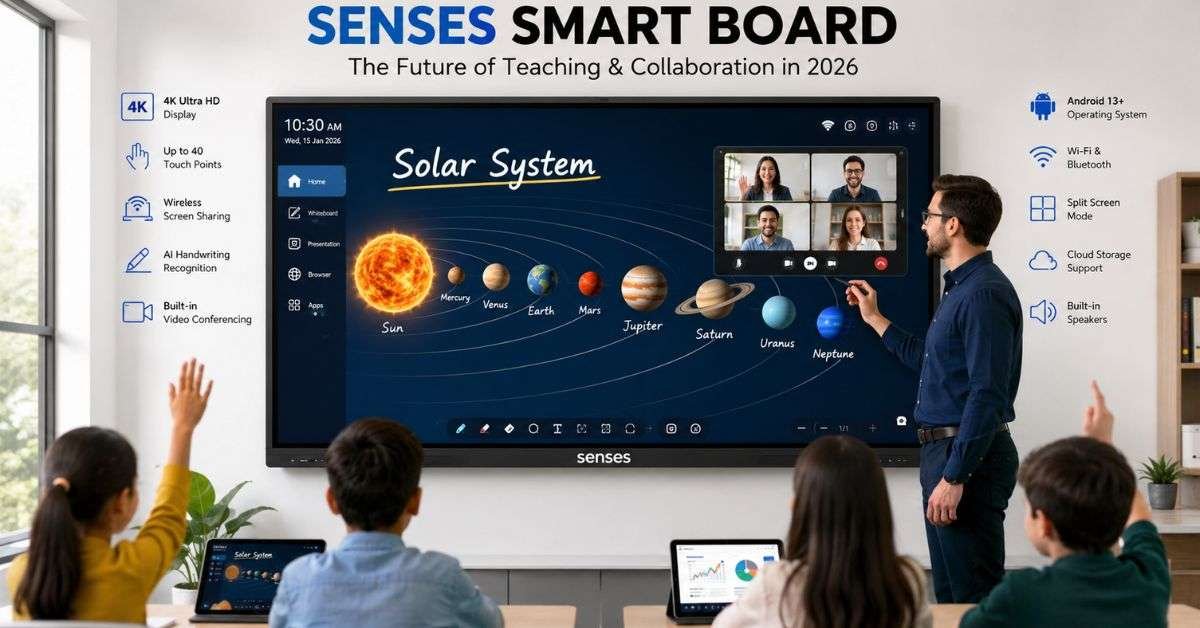
A Senses Smart Board is a large, interactive touchscreen display. Its official name is the Senses Interactive Intelligent Panel. It combines a whiteboard, computer, speaker system, and video conferencing device into one unit. Instead of writing with markers, you use your finger or a digital pen. Instead of connecting many cables, everything is built into the screen.
You can:
- Write and erase digitally
- Open apps like Zoom or Google Meet
- Show videos and presentations
- Save your notes to the cloud
The Senses Smart Board is commonly used in classrooms, training centers, and meeting rooms.
How Does a Senses Smart Board Work?
The Senses Smart Board works like a giant tablet mounted on the wall. Inside the screen, there is:
- A 4K Ultra HD display
- A built-in Android operating system
- Touch sensors that detect multiple fingers
- Speakers and microphone
- Wi-Fi and Bluetooth
When you touch the screen, the sensors detect your finger or stylus. The system responds instantly, just like a smartphone. Many models also allow you to add a Windows computer module. This makes the panel work like a full desktop computer. Because everything is built in, you do not need:
- A projector
- Extra speakers
- Separate conferencing cameras
This makes setup cleaner and easier.
Key Features in 2026 Models
The 2026 version of the Senses Smart Board includes several modern upgrades. These updates make teaching and meetings smoother and faster.
Here are some important features:
- It supports 4K Ultra HD resolution, which means the picture is very sharp and clear. Text and images look bright even in well-lit rooms.
- It allows up to 40 touch points. This means many students or team members can write on the screen at the same time.
- It includes AI-powered handwriting recognition. If you write messy text, the board can convert it into clean typed text.
- It has screen sharing. Users can connect laptops or phones wirelessly and display content instantly.
- It also supports split-screen mode. This lets you show two apps at once, such as a video and notes.
These features make the Senses Smart Board a powerful learning and collaboration tool.
Benefits for Classrooms
Interactive panels in classrooms keep the students engaged and focused. Teachers can show videos, diagrams, and interactive quizzes. Students can come to the board and solve problems directly on the screen. With a Senses Smart Board, teachers can save lessons and send them to students later. This helps students who miss class or need extra review.
Research in 2026 shows that interactive displays improve classroom participation and understanding. Students remember lessons better when they can see and touch the material. Another benefit is reduced maintenance. Traditional projectors require bulb replacements. Digital panels last much longer and use less power. It supports modern learning styles by combining visual, audio, and hands-on teaching methods.
Benefits for Offices and Businesses

The Senses Smart Board is not just for schools. Many companies use it in conference rooms and training areas.
During meetings, teams can:
- Present slides
- Write notes
- Join video calls
- Share screens wirelessly
Remote workers can join through Zoom or Microsoft Teams. The same material can be seen and used by everyone. This helps the team work together better and makes decisions faster. Notes can be saved right away and sent to everyone involved.
Because everything is built into one device, offices reduce cable clutter and technical problems. It helps create a modern, professional workspace.
Technical Specifications Overview
Below is a simple overview of common specifications in 2026 models.
| Feature | Typical 2026 Specification |
| Display Sizes | 65”, 75”, 86” |
| Resolution | 4K Ultra HD (3840 x 2160) |
| Touch Points | Up to 40 |
| Operating System | Android 13+ |
| RAM | 8GB |
| Storage | 128GB |
| Connectivity | Wi-Fi, Bluetooth, HDMI, USB |
These specifications allow smooth performance for teaching, presentations, and video conferencing. The Senses Smart Board is designed to respond quickly, with very low touch delay. This makes writing feel natural.
Comparison with Traditional Whiteboards
Many people still wonder whether upgrading is worth it. Let’s compare a digital panel with a traditional whiteboard.
| Feature | Traditional Whiteboard | Senses Smart Board |
| Writing | Marker only | Digital pen or finger |
| Save Notes | No | Yes |
| Video Calls | No | Yes |
| Multimedia Support | No | Yes |
| Maintenance | Marker stains | Minimal |
As you can see, It offers many more capabilities. Traditional boards are simple, but they cannot connect to the internet or save digital files. Interactive panels provide both teaching and computing power in one device.
Installation and Setup
Installing a Senses Smart Board is usually simple but should be done correctly.
- First, the wall must be strong enough to support the screen. These panels can be heavy, especially the 86-inch model.
- Second, you need access to a power outlet and Wi-Fi connection.
Many schools and offices hire professionals for installation. This ensures proper mounting and safe wiring. Once installed, setup takes only a few minutes. Connect to Wi-Fi, log into apps, and the board is ready to use. The user interface is simple and similar to a tablet, so most teachers and employees learn quickly.
Pricing in 2026
Prices depend on screen size and features. In 2026, estimated prices are:
- 65-inch model: around $2,000
- 75-inch model: around $3,000
- 86-inch model: around $4,500
Although the cost may seem high, remember that the Senses Smart Board replaces multiple devices. You no longer need to buy a projector, separate speakers, and conferencing tools.
Over time, this can save money on maintenance and energy bills. Schools and businesses often consider it a long-term investment.
Buying Tips
Before buying a Senses Smart Board, think about your needs. Consider room size. Larger rooms need bigger screens. Check compatibility with your current software, such as Google Workspace or Microsoft 365. Make sure the device has enough RAM and storage for smooth performance.
Also, look at warranty and support options. A good warranty provides peace of mind. If possible, request a live demo. Testing the panel helps you understand its speed and touch accuracy. Choosing the right model ensures you get the best value.
FAQs
What is a Senses Smart Board used for?
It is used for teaching, presentations, meetings, and video conferencing.
Can students write on it at the same time?
Yes, many models support up to 40 touch points.
Does it need a computer?
No, it has a built-in system, but you can add a Windows module if needed.
Is it better than a projector?
Yes, it provides clearer images and requires less maintenance.
How long does it last?
Most panels are designed to last many years with proper use.
Conclusion
The Senses Smart Board is a powerful and modern solution for schools and businesses in 2026. It replaces traditional whiteboards with a smart, all-in-one touchscreen display. With features like 4K resolution, multi-touch support, wireless screen sharing, and video conferencing, it makes learning and teamwork more interactive. It gets students more involved in class and lets teachers save digital lessons.
For offices, it improves collaboration and supports hybrid meetings. If you are planning to upgrade your classroom or meeting room, consider testing a Senses Smart Board to see how it fits your needs. A live demonstration can help you make the right choice. Technology continues to grow, and interactive displays are becoming an important part of modern education and business environments.